Naming an address
A name is a label, not a verification. Here is what the app asks for before it trusts one.
What it does
Anyone in your organization can give an address a name, such as Acme payroll
or Uniswap router, up to 64 characters. The name then shows wherever that
address appears: the history, the payment runs, the batch panel, the address
book. Names are shared across the organization, and each change is written to
the activity log with who made it.
What could go wrong without it
Someone who can edit names can point a familiar name at an address they
control. The next person to pay Acme payroll sees a name they trust and sends
the money to the wrong place. This is address poisoning, and a name on its own
does nothing to stop it.
What you see in the app
The check happens where the money is: on the send screen and in a payment run, not in the address book.
When you send to an address this Safe has never paid, or to a named address that nothing has been sent to since its name was last set or changed, the send screen shows a warning. It names who set the name and when, and says:
A saved name proves nothing on its own. Anyone who can edit the address book can point a familiar name at an address they control.
You cannot continue until you tick:
I checked this address with the recipient somewhere other than this app, and it is correct.
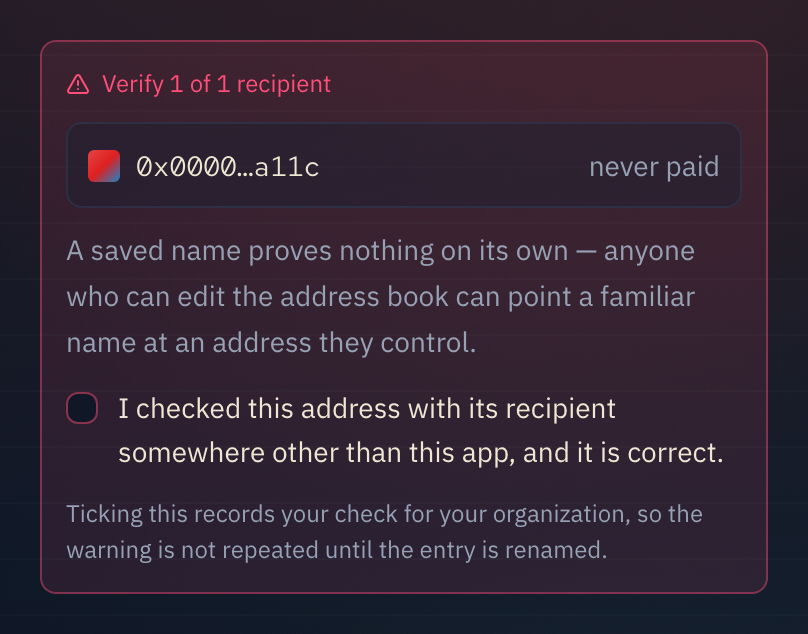
Ticking it records your check for the whole organization, with your name and the time. The next person to pay that address sees "Checked with its recipient by [you]" instead of the warning.
Renaming the entry clears that check at once, so a changed name always sends someone back to the recipient.
What it does not do
A name never marks an address as verified. Only the tick does, and only after someone went outside the app to confirm it. The app cannot tell whether that check was real. It records who said they did it, so the team can.
An address with no name cannot hold a check. If you tick the box for an unnamed address, you will be asked again next time.