Organizations and collaborators
Who can see your Safes in Tamias, what an admin can do that a viewer cannot, and why neither role is a key.
What it does
An organization is your team in Tamias. It tracks one or more Safes, and it holds everything the team shares about them: the address book, payment schedules, workflows and the activity log. The first time you sign in, the app asks you to name one, and you can belong to several. With more than one, a switcher in the top bar moves between them. Nothing is shared between two organizations, even when both track the same Safe.
Everyone in an organization is a member with one of two roles.
- Viewer. Sees every Safe the organization tracks, and can name addresses, save workflows and build transactions. Proposing or signing one also needs their wallet to be one of that Safe's owners, as it does for an admin.
- Admin. Everything a viewer can do, and also: invite and remove members, change roles, add or remove Safes, set up and edit payment schedules, rename or delete the organization, and read the activity log.
What could go wrong without it
A Safe's owners are on chain, but the people who run a treasury are not all owners. An accountant needs to read the history. A new hire needs to see the queue and the payees before they hold a key. Without a place for them, the choice is between sharing a signer's wallet and leaving them out.
What you see in the app
Settings → Collaborators lists the people. Admins come first, then one group per Safe listing everyone who signs on it, then viewers who sign nowhere. Each member's row shows their role and when they joined. An admin can change another member's role from the role tag, or remove them. On your own row, Remove reads Leave.
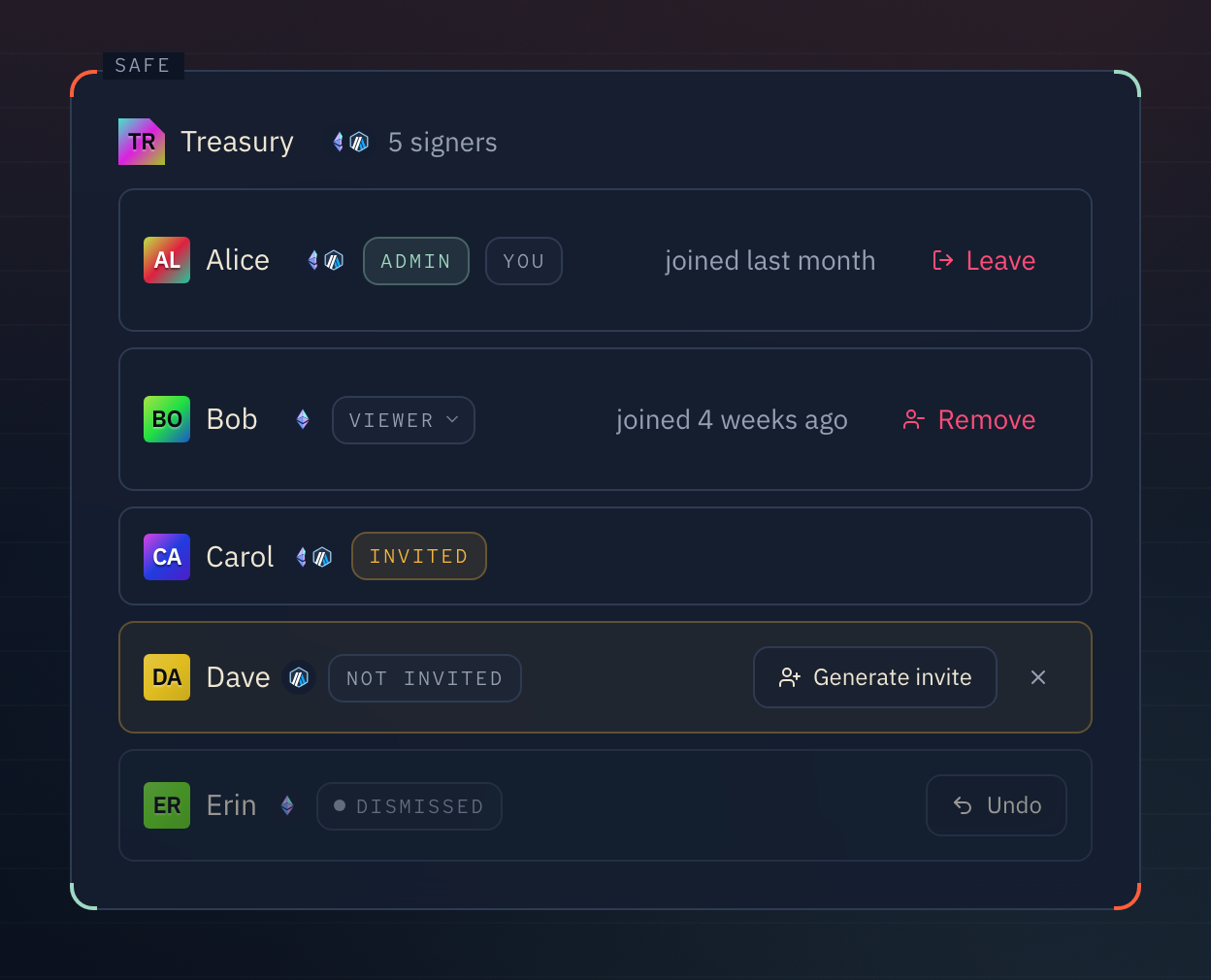
Inviting. An admin picks a role and the wallet address being invited, and presses "Generate link". The link works for that one wallet, once, for seven days. There is no email: send the link however you like. The person opens it, signs in with the invited wallet, and presses "Accept invite", which signs a message to prove they control the address. Until then an admin can revoke the invite, and restore it again.
An owner of a Safe who is not a member shows in that Safe's group as "not invited". An admin can press "Generate invite" to make them a viewer's invite in one click, or dismiss them so the app stops suggesting it.
An organization always keeps at least one admin. The last admin cannot be removed or made a viewer.
What it does not do
A role is not a key. Making someone an admin does not let them sign, and removing a member does not take away their ownership of a Safe. Whether a transaction executes is decided by the Safe's owners and threshold on chain, never by a role here. Who signs on which Safe is read from the chain, and this page only reports it.
Membership is the whole organization or nothing. You cannot give a member some of its Safes and not others.