Automating a workflow
Let any one signer run a workflow without collecting signatures, only that workflow, within limits the chain enforces.
What it does
A workflow normally runs like any other transaction: someone presses Run, and the Safe's owners sign it. Automating it changes that for this one workflow. Once it is on, any one of the Safe's signers can run it from their own wallet, and nobody else signs.
The Safe does not hand over control. Turning it on installs a permission on chain that allows exactly the calls the workflow makes, to the same contracts, with the money landing in the same place, up to an amount and a number of runs per period that you choose. Anything else a signer tries through the permission is refused by the chain, not by Tamias.
What could go wrong without it
A weekly claim-and-compound on a 3-of-5 Safe needs three people every week, for a batch that is identical every week. The run waits for whoever is slowest to sign, and the owners learn to sign it without reading it. That is the habit that lets a bad transaction through.
What you see in the app
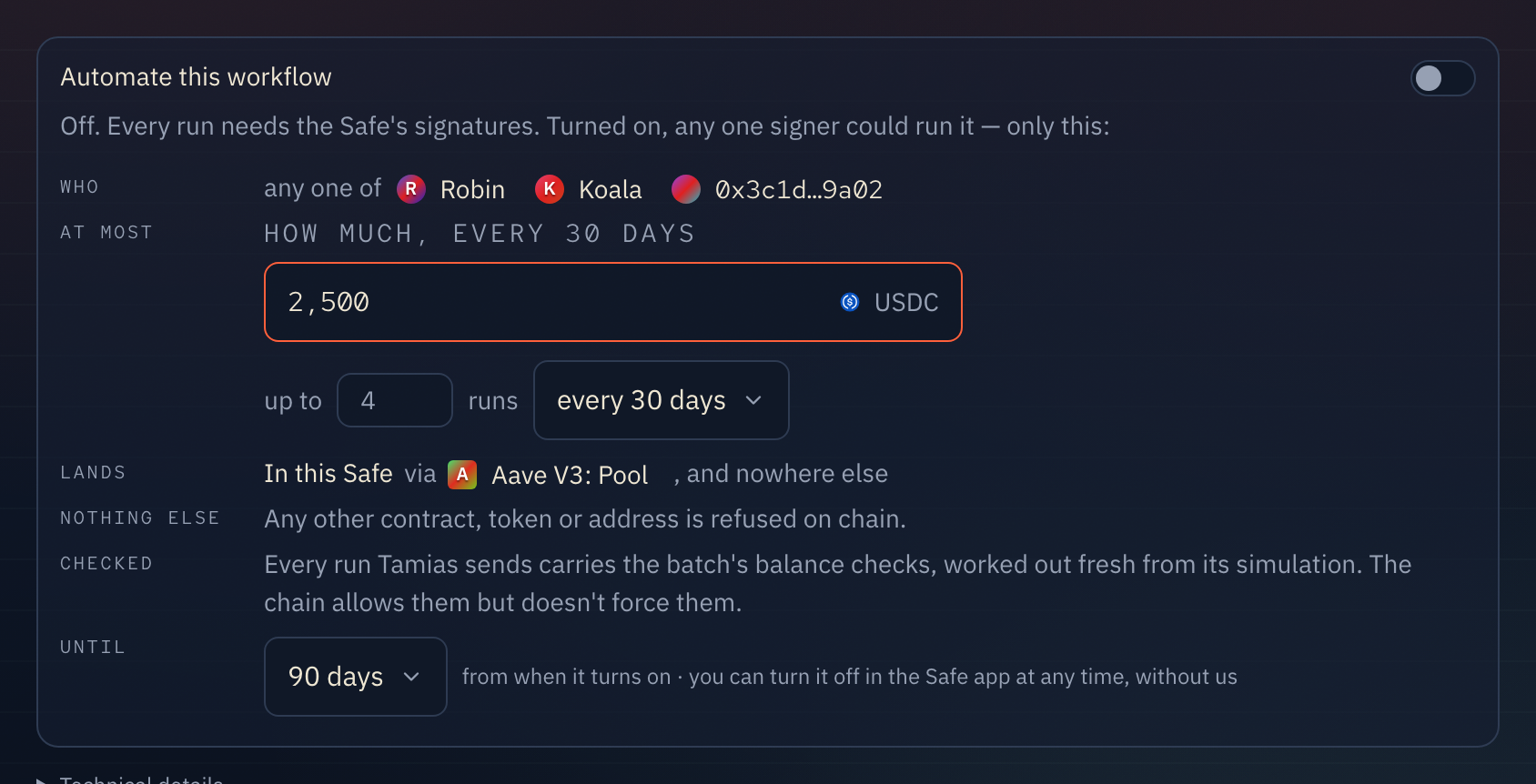
The workflow page has a box under the batch with one switch: Automate this workflow. Below it, what the permission would allow, in six lines:
| Line | What it says |
|---|---|
| WHO | The Safe's signers, as they are when it turns on, and any run keys you add. Any one of them can run it. |
| AT MOST | How much of each token it may move per period, in up to how many runs. You choose the period: a day, a week, every 2 weeks, every 30 days or every 90 days. The amount starts at what the recording moves, times the number of runs, and you can change it. If the recording doesn't say how much, for example because a step spends "whatever the claim produced", you set the amount before turning it on. The default is one run a week. |
| LANDS | Where the funds end up: in this Safe, through the contracts the workflow calls, and nowhere else. |
| NOTHING ELSE | Any other contract, token, function or recipient is refused on chain. |
| CHECKED | Every run Tamias sends ends with the batch's balance checks. See checks below. |
| UNTIL | How long it stays on: 30, 90 or 180 days, or a year. The default is 90 days. |
Once it is on, a seventh line appears, THIS PERIOD. It shows what is left, read from the chain: "0 of 1 run left · 0 of 0.00001 WBTC", and when it refills, e.g. "refills Thu 1 Oct, 00:00 UTC". Periods count from a fixed point on chain, not from when you turned it on, so a weekly limit refills on Thursdays at 00:00 UTC.
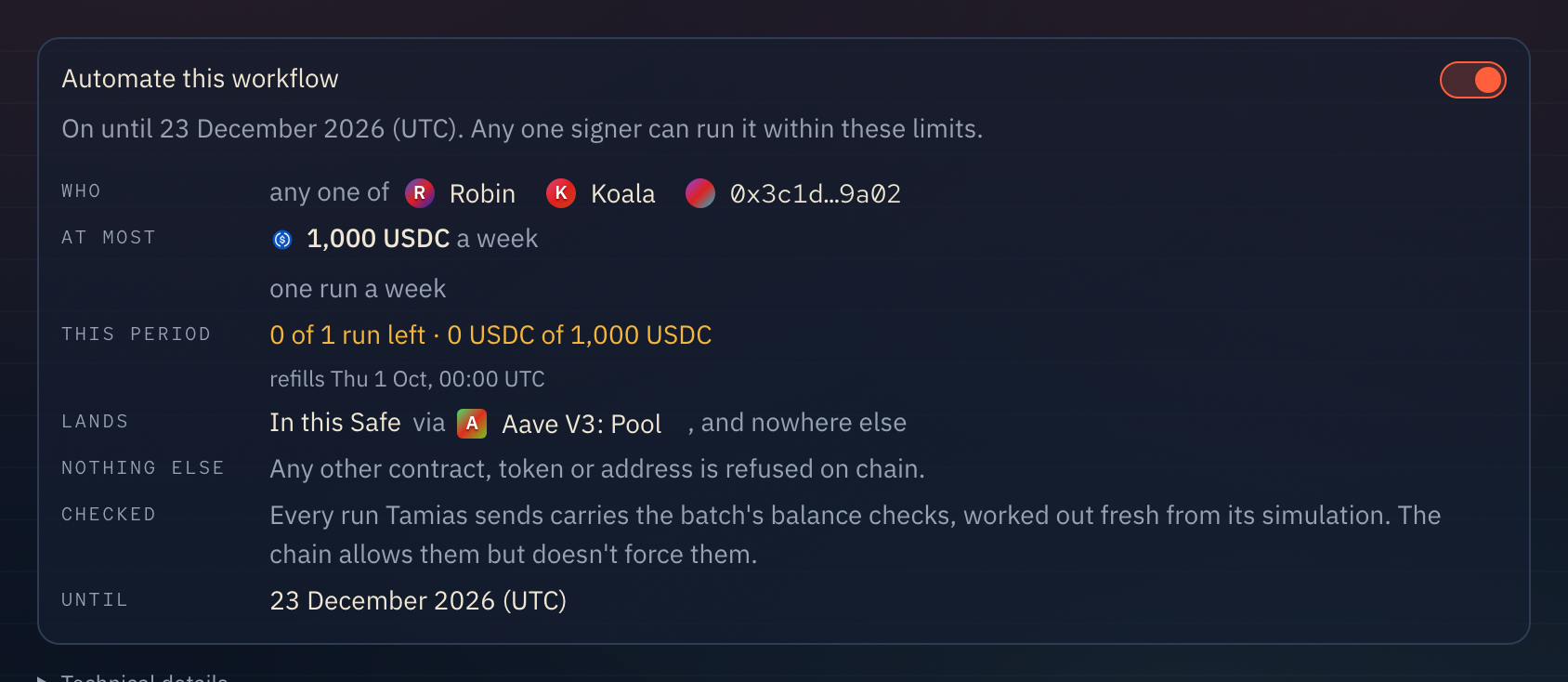
Turning it on takes one Safe transaction, signed by the owners like any other. The box opens in place. It shows the calls the transaction makes and a simulation of them, then asks for your signature. Nothing changes until the Safe executes it. Until then, the box turns amber and says so: how many have signed of how many it needs, with Open to sign to go to the transaction. The choices you made show as they were proposed, and can't be edited while it waits.
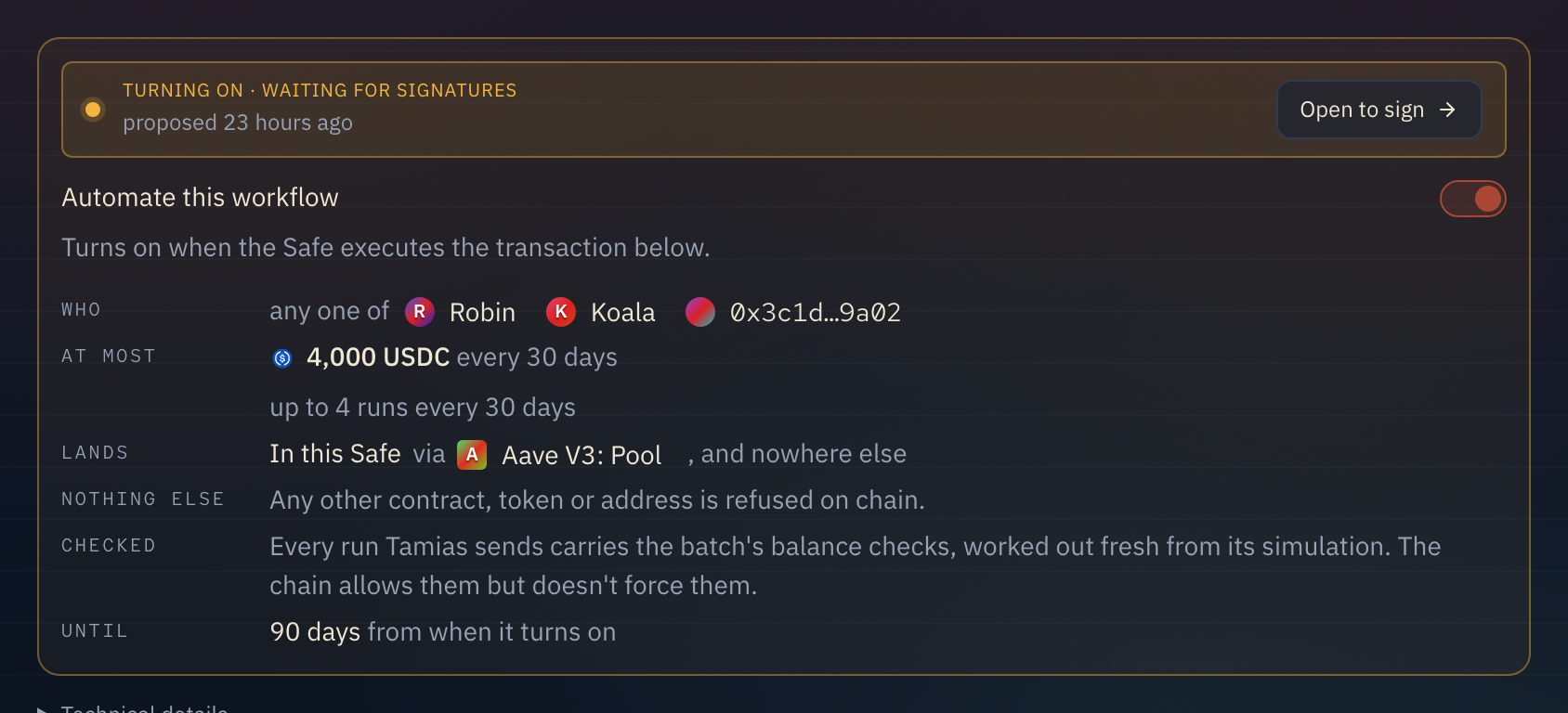
Signing it. The other signers see it in their To do list, and on its own page, as a few plain lines: set up this Safe's Roles modifier (the first time only), allow only this workflow to run without signatures, at most how much per period and until when, and how many signers can run it. The raw calls, about twenty for a first install, are one click away under "What the Safe signs", with the contracts they go to and their audits.
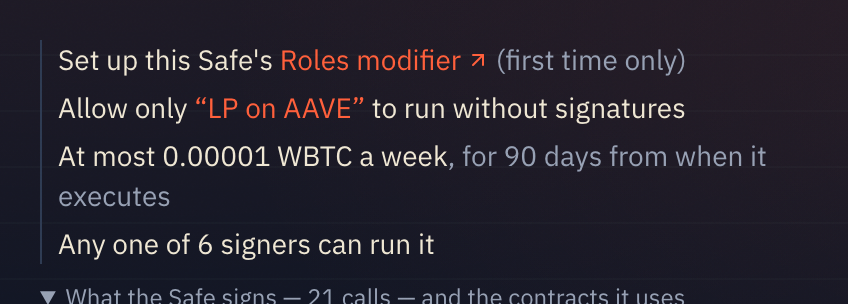
What that one transaction does:
- Deploys this Safe's own Roles modifier, owned by the Safe (only the first time).
- Lets it check each call inside a batch, not the batch as a whole.
- Enables it as a module on the Safe (only the first time).
- Writes this workflow's permission: the contracts, the functions, the arguments pinned to what was recorded, and the amounts and run counts per period.
- Gives each signer a membership that covers this workflow.
Running it. Once it is on, a signer sees Run as before, and the note under the batch reads "Run sends it now from your wallet. No signatures needed." The amounts are locked to the permission, the batch is simulated, and your wallet sends it. You pay the gas. The run is listed under the workflow's runs with who ran it and its transaction.
When this period's limit is used up, Run doesn't try: it proposes the run to the Safe like any other transaction, and the note under the batch says so and when the limit refills. If the chain would still refuse a run, the app says why in plain words before anything is sent: "this run would spend more USDC than is left of what the permission allows a week", or "your wallet is not one of the signers this workflow was allowed for".
After a run lands, the Safe's positions and balances update on their own, as they do after any transaction.
Limits, and why they are the way they are
An amount and a count, per period, both on chain. The amount of each token and the number of runs are two separate limits, and the chain refuses a run that breaks either. The default, one run's amount once a week, is the smallest permission that still lets a weekly workflow run. A stolen key can repeat the workflow at most as often as the period still allows, to your own Safe, and that is all. So choose the smallest period and count the workflow needs.
The period is exact. "Every 30 days" is 30 days on chain, never a calendar month, so it drifts against month ends.
Only where it was recorded. Every argument that names a recipient is pinned to this Safe or to the address in the recording. A signer cannot send the funds anywhere else.
The Safe's signers when it turned on. The permission keeps the members it was given. An owner added later is not one of them. An owner removed from the Safe stays a member, and can't sign anything else on the Safe. Either way, allowing it again (Change run keys, or Update it) sets the members to today's signers and run keys, and takes off anyone no longer listed.
Run keys
A run key lets code run the workflow, without making that code a signer.
It is a wallet address your script holds. Adding it gives that address this workflow's permission and nothing else. It can run this workflow, within the same limits as a signer, to the same places, and it can't sign anything for the Safe. The Safe's owners and threshold don't change. The other way to let a script run a workflow is to add its key as a Safe owner (3 of 4 becomes 3 of 5). Then the key could co-sign anything the Safe does, which is far more than a script on a server should hold.
Adding one. Under WHO, press Add a run key and paste the address. On a workflow that is already automated, press Change run keys under the box. Either way it goes into the one Safe transaction the owners sign, and the co-signers see it named there: "So can run key 0x… — not a signer; it can run only this workflow".
What it can't be. A Safe signer (it can already run it), the Safe itself, or the Safe's Roles modifier. A workflow can have five run keys at most.
Removing one. Press × next to it under Change run keys, and propose. Once that transaction executes, the chain refuses the key. Turning automation off removes every run key with the signers.
Paying for runs. The run key sends the transaction, so it pays the gas. Keep enough of the chain's native token in it for the runs you expect.
Checks
When a step's amount can move before it executes, a Tamias batch ends with a call to Bounds. Bounds undoes the whole batch if the Safe's balances land outside what was expected. An automated run carries the same checks, worked out fresh from that run's simulation.
The permission allows the checks but cannot require them. Roles, the contract that enforces the permission, has no way to say "this call must be last". So the checks are enforced by Tamias: the app will not send a run without them. A signer who builds a run by hand, outside Tamias, can leave them out. They still can't move more than the limit for the period or send it anywhere but where it was recorded.
When it stops
- When it runs out. On the date under UNTIL, Tamias stops sending runs. The permission stays on the Safe until someone removes it. The box then shows "Turn on again" and "Remove it from the Safe".
- When a contract it calls is upgraded. Tamias records the code behind each upgradeable contract the workflow calls. If that code changes, runs are refused: "the contract was upgraded since this workflow was allowed, so an allowed call may now do something else — check what changed, then allow it again."
- When Tamias changes how limits are worked out. Then the Safe holds an older version of this workflow's limits, and the box says so. Runs without signatures are refused until the owners sign "Update it".
- When you turn it off. Flip the switch off. That proposes one Safe transaction, which removes exactly what turning it on added: the scope and each membership.
The review list. The Workflows page lists every workflow on the Safe that runs without signatures, under Running without signatures. Each one shows how long it has left and when it last ran. It is tagged EXPIRED once it ends, and UNUSED 90 DAYS when nobody has used it for that long. Each row has its own Turn off.
Turning it off without Tamias
The permission lives in a Zodiac Roles modifier that your Safe owns, not Tamias. To remove it without us, disable the modifier as a module in the Safe app (Settings → Modules), or remove it with any Safe transaction. After that, no workflow on that Safe runs without signatures.
The contracts it uses
Tamias did not write or deploy these. They are Zodiac Roles, by Gnosis Guild, which is widely used by DAO treasuries. Each has the same address on Ethereum, Arbitrum, Base, Berachain and Robinhood Chain.
| Contract | Address |
|---|---|
| Roles modifier v2.1.1 (the code every Safe's modifier runs) | 0xf2964ce6161ce0e75964fe7927ce114cb0b283d5 |
| Module proxy factory 1.2.0 (deploys your Safe's own modifier) | 0x000000000000aDdB49795b0f9bA5BC298cDda236 |
| MultiSend unwrapper (lets Roles read each call in a batch) | 0xB4Cd4bb764C089f20DA18700CE8bc5e49F369efD |
Tamias installs v2.1.1 only. Gnosis Guild's own registry marks v2.1.0 as faulty.
Audits. Roles v2 and v2.1 were audited four times in 2023: twice by G0 Group (April and November) and twice by Omniscia (May and November). The reports are in the Roles repository, next to the source.
What it does not do
- It does not run on its own. Tamias has no schedule or trigger of its own. A signer presses Run, or your code decides when and sends the run from a run key: see Run a workflow from code.
- It does not work for a workflow with a swap yet. The contract a swap goes through isn't one the permission can pin down. The box says "Can't be turned on" and why.
- It is not given to anyone you didn't name. Only the Safe's signers and the run keys you add. Never to Tamias, never to a relayer.